
A powder coat can leave the oven smooth and even, in exactly the right colour, and still be under-cured. It can be softer than the data sheet promises, weaker in adhesion, and short on the chemical and weather resistance your customer is paying for. Nothing on the surface warns you. To know that a part met its cure schedule, you have to measure the part itself as it travels through the oven, and that is what an oven temperature logger does.
Storm Machinery is the South African representative and an authorised service centre for DeFelsko, maker of the PosiTest OTL Oven Temperature Logger. Whether you run one batch oven or a long conveyor line, our team can help you work out the right kit and probe combination for your oven, plan your first profile run, and handle certain repairs locally.

OUR INSPECTION EQUIPMENT
Showing the single result

What Is Oven Temperature Profiling?
Oven profiling means sending a multi-channel data logger through a curing cycle together with real parts. Thermocouple probes are fixed to the parts at chosen points, with at least one left in the open oven air. The logger rides along inside an insulated barrier box that keeps its electronics cool, and it reads every probe at a fixed interval for the whole run. Afterwards, the data downloads as one curve per probe, temperature plotted against time. Together, those curves are the oven’s profile. They show how quickly each part heats up, where the oven runs hot or cool, and how long each measuring point actually spends at curing temperature. The method works in a conveyor oven, where the logger travels down the line with the load, and in a batch oven, where it sits in with the parts for the cycle.
Why The Oven Display Isn't Your Part's Temperature
The oven controller’s display shows air temperature, taken at one fixed sensor. A powder’s cure schedule is written around the part instead: the metal itself must spend a set time at or above a set temperature. Those figures vary widely from one powder to the next, so always work from the data sheet for the powder you’re using. The clock doesn’t start when the oven door closes, either. It starts once the part has caught up with the air around it.
On a mixed load, parts catch up at very different speeds. A heavy casting or a thick flange can spend much of its dwell time just warming through, and leave the oven with only part of the cure it needed. A thin sheet panel on the same rail reaches temperature in minutes and may then overbake, which can show as yellowing, lost gloss or a brittle film. Both went through the same oven at the same setting, and only probes on the parts themselves will show the difference.
Cure doesn’t simply switch on at the target temperature, either. A powder starts reacting once it passes its activation temperature, which sits below the target, and it reacts faster above the target. Counting the minutes above a single line can therefore misjudge a run in either direction. That’s why the PosiTest OTL’s software weighs the whole curve against the supplier’s schedule (see the Cure Index question in the FAQ below).
Calibration You Can Put In Front Of An Auditor
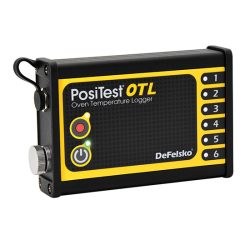
Every PosiTest OTL ships with a long-form calibration certificate traceable to NIST. The certificate lists the actual readings taken on that logger in DeFelsko’s lab, rather than a bare statement of conformance, and each temperature probe comes with its own NIST-traceable certificate as well. The logger has six K-type thermocouple channels, reads to 0.1 °C with an accuracy of ±0.5 °C, and accepts thermocouple readings from −100 °C to 1,000 °C.
Thickness and profile gauges are checked against published test methods, but oven loggers aren’t tied to a single one. The pass mark comes from your powder supplier’s cure schedule and from whatever your customer or quality system specifies, and the logger supplies the evidence. Each run can be saved as a PDF report with its curves, Cure Index and notes on where the probes were placed. That gives you a ready record for quality files, customer audits, or any approval that asks you to prove your oven performs.
Buyer's Guide - Matching A Kit To Your Oven
The PosiTest OTL logger is the same in every configuration. What changes is the protection around it, which decides how long and how hot a run it can survive. Choose a kit for your longest, hottest cycle, then add the probes that suit your parts. Every oven needs its own mix of kit, probe styles and cable lengths, so we import each PosiTest OTL setup to order once it’s confirmed. Talk to us about your oven first and we’ll help you specify the right combination.
PosiTest OTL Kit
The standard kit is the place to start for most powder lines curing in the usual temperature range. The logger travels on the standard holder inside a stainless steel barrier box lined with fibreglass and made without silicone, a common cause of surface defects in paint and powder shops. DeFelsko rates this kit for 90 minutes at 150 °C, 65 minutes at 200 °C and 50 minutes at 250 °C, and doesn’t recommend it at 300 °C. It weighs about 9 kg and comes with six engraved probe ID tags, a carry case and PosiSoft Desktop software. See our PosiTest OTL Oven Temperature Logger for the full kit contents.
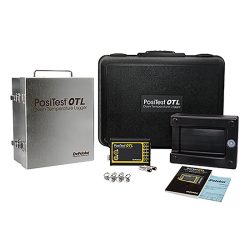
PosiTest OTL XT Kit
The XT kit suits long conveyor ovens, higher cure temperatures, and any job where the standard kit’s run times are too tight. It uses the Holder XT, which adds a heatsink that absorbs heat before it reaches the logger. This extends the rated run time to 300 minutes at 150 °C, 200 minutes at 200 °C and 140 minutes at 250 °C. It’s also the only configuration DeFelsko rates for 300 °C, for up to 100 minutes. The trade-off is weight: about 11 kg with the XT holder, against 9 kg for the standard kit.
PosiTest OTL Logger Only
The logger on its own, with no barrier box or holder, suits a batch oven where the logger can stay outside and only the probe cables run in. Unprotected, it’s rated for 0-70 °C, so it must never go into a hot oven without its barrier box. Pair it with longer probe cables (3.6 m or 6 m) so they reach from the logger to the parts inside.
Temperature Probes
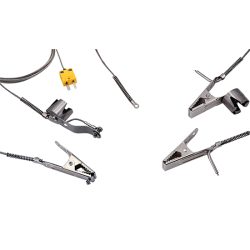
Probes are sold separately. Every one is a K-type thermocouple on a stainless steel braided cable, available in 1.8 m, 3.6 m or 6 m lengths, and each comes with its own NIST-traceable certificate. Surface probes measure the part itself and come with three kinds of fixing:
- magnetic, for steel parts
- spring clamp, for aluminium and other non-magnetic parts, or for edges
- washer-style, for parts held by a bolt or screw
Air probes, in clamp or magnetic versions, measure the oven air around the load. A practical first set across the logger’s six channels is four or five surface probes plus one air probe.
Quick Reference: Which OTL Setup For Which Oven
- Cure cycles up to 250 °C that fit the standard run times (90 min at 150 °C, 65 min at 200 °C, 50 min at 250 °C) → PosiTest OTL Kit
- Long conveyor ovens, or runs longer than the standard kit allows → PosiTest OTL XT Kit
- Curing at around 300 °C → PosiTest OTL XT Kit ==only== (rated 100 min at 300 °C)
- Batch oven where the logger can stay outside → PosiTest OTL Logger Only, with 3.6 m or 6 m probes
- Steel parts → magnetic surface probes
- Aluminium, non-magnetic parts, edges or thin sections → spring clamp surface probes
- Parts hung or fixed through a bolt hole → washer surface probes
- Oven air around the load → air probe (clamp or magnetic)
FAQs
Is an oven temperature logger the same as an oven data logger or oven profiler?
Yes. Whether a supplier calls it an oven data logger, oven logger, oven profiler, oven temperature recorder or thermal profiling system, the instrument works the same way: a multi-channel logger that rides through the oven inside a heat shield, recording probes fixed to the parts and hung in the air. What it isn’t is a single-point oven thermometer or the oven’s own controller. Both of those read the air at one spot and say nothing about what the parts went through.
Is this the same as the temperature readings in environmental monitoring?
No. Environmental monitoring gauges check site conditions before and during coating: air temperature, relative humidity, dew point and steel surface temperature. An oven temperature logger works at curing temperatures and records a whole curing cycle. To check whether it’s safe to paint, see our Environmental Monitoring range. To check whether a coating cured, you’re in the right place.
What is the Cure Index?
It’s PosiSoft Desktop’s way of boiling a whole run down to one percentage per probe, showing how close that spot came to the cure your powder supplier specifies. You enter the supplier’s activation temperature and cure schedule, and the software scores the full curve instead of counting minutes past a single line (see “Why The Oven Display Isn’t Your Part’s Temperature” above). Read the score probe by probe. Under 100%, the coating at that spot may be short of full cure and may not perform as specified. Over 100%, that spot met the schedule.
Where should I put the probes?
Start with one probe in the open oven air: it’s the baseline the parts are chasing. Use the rest to find the extremes of the load. That means the heaviest section, which will lag furthest behind, and the thinnest, which will get there first, spread across the top and bottom of the rack, since temperature often varies with height. Each surface probe should sit on a clean, uncoated spot so it reads the metal and not the powder. Record and photograph the layout in PosiSoft Desktop so the next run can repeat it.
What does PosiSoft Desktop do with the data?
The software costs nothing, runs on a PC or Mac, and doesn’t need an internet connection. A downloaded run shows each probe as its own colour-coded curve, which you can name by channel and annotate. From there you can track time above as many as three threshold temperatures, calculate the Cure Index, and lay the run over a saved reference batch from a run you know was good. No two runs go into the oven after exactly the same delay, so Start at Temperature lets you pick a probe and a trigger temperature, and the run’s timeline begins when that probe reaches it. Reports export as customisable PDFs carrying your own logo and cover page, or as CSV files for a spreadsheet.
How often should the PosiTest OTL be recalibrated?
Plan on once a year to begin with, counted from the day the logger first goes into service, then adjust the interval to how hard yours works. A logger that rides through a hot oven every shift and is packed and unpacked daily may need checking sooner than one used for a quarterly audit. The certificate itself has no expiry date, so the real deciding factor is often your customer’s specification or your quality manual: if either sets a shorter interval, that one takes priority.
Can the temperature probes be recalibrated?
No. DeFelsko doesn’t recertify OTL probes, because calibrating one takes long enough that a replacement probe costs less. Each new probe arrives with its own NIST-traceable certificate. Because probes are clamped on and handled on every run, it’s worth keeping a spare or two in the fixing style you use most.
Can Storm calibrate and repair the PosiTest OTL locally?
Storm Machinery can carry out certain repairs in-house here in South Africa, but calibration has to go overseas: the logger itself can only be calibrated by DeFelsko at its facility in the USA. The probes aren’t calibrated at all (see the question above). Contact our team before sending anything and we’ll advise you on the process. See our DeFelsko Calibrations & Repairs service for more.
Is an oven temperature logger only for powder coating?
Powder coating is the main use, but the same profiling works for other industrial heat-curing processes, such as stoving liquid paints. It applies wherever a part has to reach a temperature and stay there for a set time. Before profiling a new process, check two limits: the barrier box run time at your temperature, and the rating of each probe you plan to use.
Other Checks On A Cured Finish
Heat is only half of a good cure. Pair your oven profile with checks on the finished film itself. If one of them reads wrong, the profile shows whether the oven played a part.
What The Oven Was Curing - Coating Thickness Gauges
A powder’s data sheet gives a recommended film thickness alongside its cure schedule. Measuring the cured film with one of our coating thickness gauges rules film build in or out before you start adjusting oven settings to chase a gloss, hardness or adhesion problem.
Proof The Film Has Set - Hardness Testing
Pencil hardness is one of the quickest ways to check a cured powder film on the line. A film that scratches more easily than the powder’s stated hardness is a common sign of under-cure. Our hardness testing range covers pencil testers as well as Shore and Barcol instruments.
A Finish Off Its Target - Gloss Measurement
Gloss is often the first property to drift when a cure goes wrong in either direction. Checking finished parts with one of our gloss meters against the powder’s specified gloss level flags a batch worth comparing with its oven profile.
Planning your first profile run? Tell our team your oven type, cure temperature and longest cycle, and we’ll help you specify the kit and probes to order.